
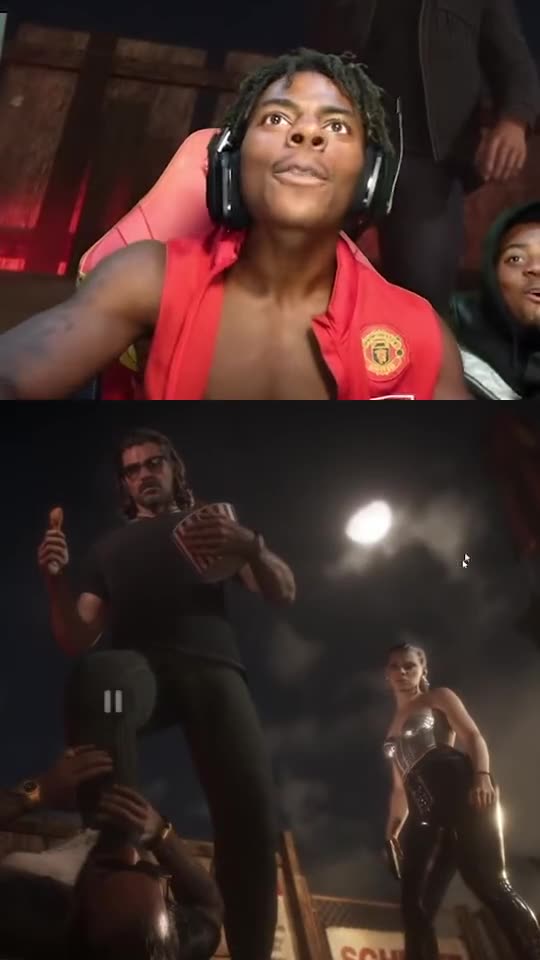
Auto Reframe to Vertical 9:16 That Follows the Speaker
Turn horizontal videos into vertical 9:16 clips automatically. The AI follows whoever is talking and stacks facecam and gameplay for TikTok, Shorts and Reels.
Most long videos are filmed horizontally, in 16:9. TikTok, YouTube Shorts and Instagram Reels are vertical, in 9:16. A plain center crop cuts people out of the frame half the time. Dramanado reframes every clip intelligently so the right thing stays on screen.
It follows whoever is talking
The vertical frame follows whoever is talking. When the conversation moves from one person to another, the frame moves with it. This is what makes interviews, podcasts and multi-person videos watchable in vertical. See podcast to clips for two-speaker setups.
Facecam and gameplay, stacked automatically
Streams usually show gameplay with a small facecam in a corner. Cropping to vertical would lose one or the other. Instead, Dramanado stacks them: the facecam on one part of the screen and the gameplay on the other, so viewers see both your reaction and what caused it. No layout to draw, no template to set up.
- Works for Twitch and Kick VODs: see Twitch VOD to TikTok clips.
- Keeps the reaction visible, which is often the reason people watch.
- Leaves room for captions without covering faces.
Editing adapts to the video type
Framing is part of a wider edit tuned to the video type: podcast, talking head, gaming, reaction, sport, vlog/IRL or comedy. The type is set automatically, or you can choose it in the editing step. A podcast edit does not move like a gaming edit, and the AI treats them differently.
Where the captions go
Caption placement is part of the frame. On Auto, captions are placed where they do not cover the action. You can also force them to the bottom or the center. Details in animated captions.
Why reframing matters for reach
Short-form feeds are full screen. A clip with black bars or a cropped-out speaker looks like a lazy repost and gets scrolled past. A clean vertical frame that keeps faces in shot looks native to the platform, which helps people stay to the end.
How it fits the rest of the edit
Reframing works hand in hand with the rest of the edit. Zooms on punchlines and animated captions fit around the people on screen instead of covering them, so every clip looks clean in vertical.
You do not need to prepare anything in your source video. Paste the link or upload the file in the dashboard, and every clip is reframed automatically.
Does it work with two people on screen?
Yes. The frame follows whoever is talking, so it switches between speakers as the conversation goes.
Do I need to set up a facecam layout?
No. Facecam and gameplay are stacked automatically.
Can I export in 16:9?
Clips are made for vertical feeds (9:16): TikTok, YouTube Shorts, Instagram Reels and Facebook.
Try it on your own video
Paste a Twitch, Kick, YouTube or TikTok link and get captioned clips in minutes.