
AI Gaming Clips: Turn Gameplay into TikTok and Shorts Highlights
Gaming creators: turn gameplay and streams into vertical highlight clips. Facecam and gameplay stacked, best moments picked even without commentary.
Gaming content is made for short-form: clutch plays, fails, rage moments and reactions. But gameplay is horizontal, the best moments are buried in long sessions, and some of them have no commentary at all. Dramanado is built to handle all three.
Great moments, even without commentary
Commentary is a bonus, not a requirement. Gameplay without talking and action-heavy moments still get picked, so your best plays make the cut even when you say nothing. See viral moment detection.
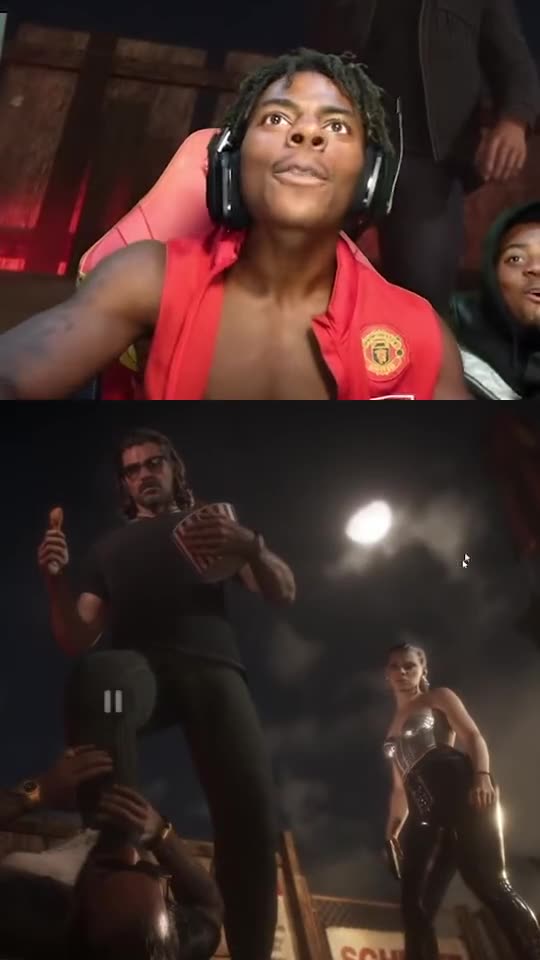
Facecam and gameplay, stacked
If you play with a facecam, it is stacked with the gameplay in the vertical frame automatically: your reaction on one part of the screen, the action on the other. No template to set up. Without a facecam, the edit focuses on the game. More in smart vertical reframing.
Gaming-tuned editing
Set the video type to Gaming, or leave it on Auto. The edit adapts to gaming pacing. Options that fit gaming well:
- Zooms on big moments and punchlines.
- Sound effects on cuts and key moments.
- Animated emojis on the strongest words.
- Caption styles like Glitch, Tech, Speed or Giant word.
- Endings like Glitch, TV switch-off or Freeze frame.
From session to clips
- Paste a Twitch, Kick or YouTube link, or upload your recording (up to 4 GB).
- Pick a range of up to 70 minutes if the session is longer.
- Choose your platform and length: Short for reach, Monetizable (61-90 s) for TikTok rewards.
- Launch from the dashboard and download your clips.
A note on game footage
Clipping your own gameplay is the clear case. Each game publisher has its own policy on monetizing footage, and clips of other players' streams need their permission. See clipping, copyright and permission.
Turning clips into a series
Gaming moments often build on each other: a run, a boss fight, a ranked climb. When the original video continues after a clip, you can continue it into a part 2 that starts where part 1 ends. Numbered parts give viewers a reason to follow you for the next one. See clip length and format.
Does it work for gameplay with no commentary?
Yes. The AI still picks the strongest moments, even when nobody talks.
Can I upload my own recordings?
Yes. Upload MP4, MOV, MKV or WebM files up to 4 GB, or use a Google Drive or Dropbox link for bigger files.
What clip length works best for gaming?
Very short or Short clips loop well and grow reach. Use Monetizable (61-90 s) if you are eligible for TikTok's rewards for videos over 1 minute.
Try it on your own video
Paste a Twitch, Kick, YouTube or TikTok link and get captioned clips in minutes.